Your portfolio might be sabotaging your job search before recruiters even see your qualifications. A staggering 90% of applications are eliminated during initial screening due to preventable portfolio errors, and with hiring managers spending mere seconds reviewing candidates, every detail matters.
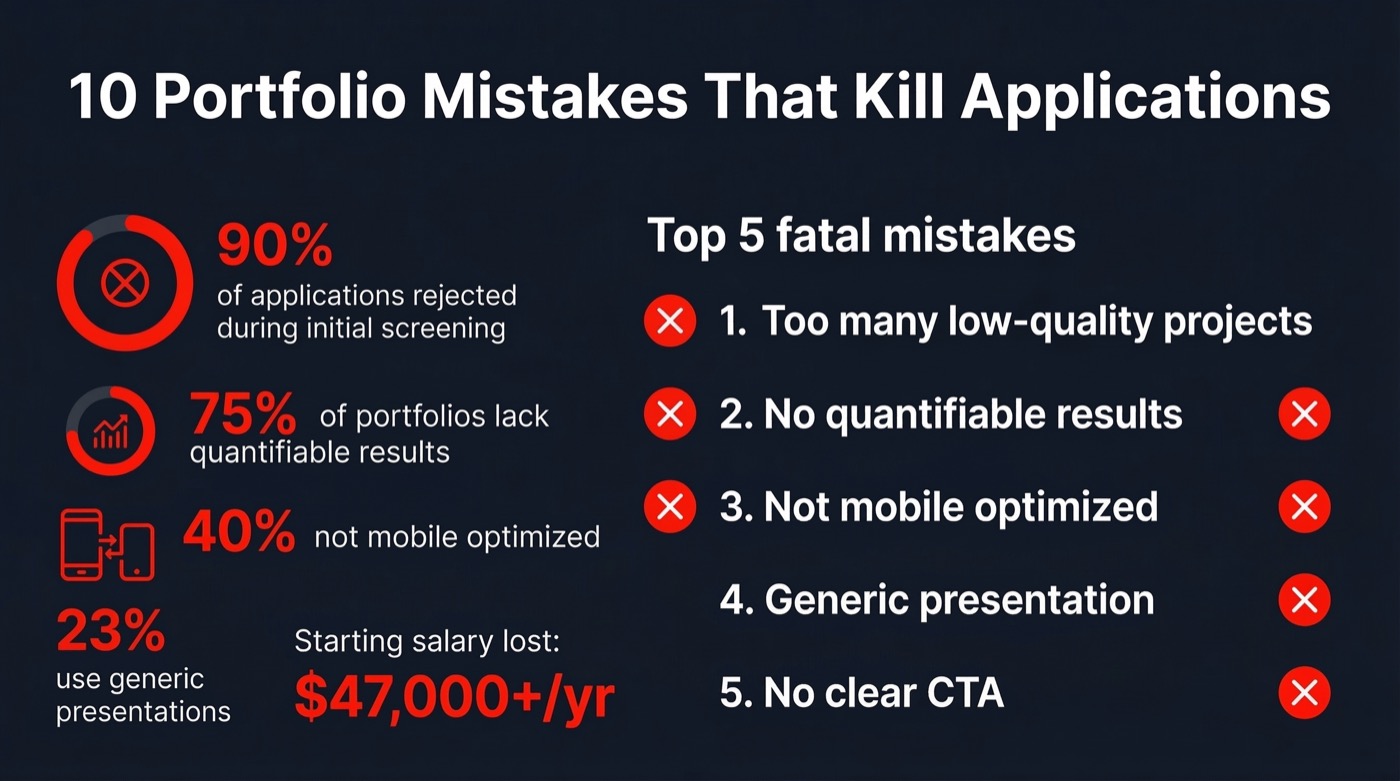
The quick answer: The most critical portfolio mistakes include showcasing too many low-quality projects, lacking quantifiable results, ignoring mobile optimization, using generic presentations, and missing clear calls-to-action. These errors signal unprofessionalism and result in immediate rejection by both Applicant Tracking Systems and human recruiters.
In today’s hyper-competitive job market, your portfolio serves as your first impression and primary differentiator. With ATS systems filtering up to 75% of applications automatically, understanding these critical mistakes isn’t optional. It’s essential for career success across all industries and experience levels.
The “More Is Better” Myth: Quality Over Quantity
The biggest mistake job seekers make is treating their portfolio like a digital storage unit. Many candidates include every project since college, creating cluttered experiences that force busy recruiters to wade through mediocre work.
Here’s the harsh truth: hiring managers judge you by your weakest piece of work. When your portfolio contains 20 projects ranging from exceptional to amateur, recruiters remember the amateur work and question your judgment for including it.
Strategic Curation Wins Jobs
A winning portfolio showcases only your absolute best work directly relevant to the target position. This approach demonstrates professional maturity and self-awareness that managers at top-tier companies highly value.
Consider this strategic approach:
- Include 5-7 outstanding projects maximum that demonstrate skills matching the job description
- Remove school projects unless they’re exceptionally relevant and professionally executed
- Eliminate minor volunteer work or low-stakes assignments that dilute your expertise
- Update your portfolio quarterly, removing outdated work that no longer represents your current skill level
Missing the Numbers: Results Trump Responsibilities
Writing “I managed social media accounts” tells recruiters nothing about your impact. Stating “I grew the Instagram following by 40% and generated 500 new leads” demonstrates tangible value you bring to organizations.
US companies operate in results-oriented cultures and demand evidence of Return on Investment when hiring. Portfolios lacking numbers, percentages, or specific business outcomes lack the persuasive power needed to secure competitive job offers.
How to Quantify Every Achievement
Even roles without obvious metrics can showcase measurable impact. Follow this framework:
- Identify the business problem your project solved
- Quantify the solution’s impact (time saved, money earned, efficiency gained, users reached)
- Compare before and after states with specific numbers or percentages
- Include timeframes to demonstrate speed of results
Replace vague descriptions with power statements like “Redesigned checkout flow, reducing cart abandonment by 23% and increasing monthly revenue by $47,000 within 90 days.”
The Mobile-First Imperative That Kills Applications
Many US recruiters conduct initial candidate screening on smartphones while traveling or between meetings. A desktop-only portfolio mindset is dangerously outdated in 2026.
Portfolios displaying as a mess on mobile screens with tiny text, overlapping images, or untappable buttons result in instant dismissal. Your portfolio must be beautiful and accessible on every device, reflecting understanding of mobile-first workplace realities.
| Portfolio Element | Desktop Experience | Mobile Experience | Impact on Hiring |
|---|---|---|---|
| Text Size | 14-16px readable | 16-18px minimum | Tiny text = immediate exit |
| Navigation | Hover menus work | Touch-friendly buttons required | Broken nav = unprofessional signal |
| Images | High-resolution displays | Optimized load times essential | Slow loading = abandoned review |
| Contact Forms | Multi-column layouts | Single column, large fields | Difficult forms = lost opportunities |
Navigation Nightmares: The Two-Click Rule
If hiring managers cannot find your work samples within two clicks, they’ll likely abandon your portfolio. Over-designed portfolios with confusing menus, broken links, or “coming soon” pages frustrate users and suggest you produce disorganized work.
Your portfolio itself demonstrates your ability to present information clearly. Poor navigation serves as a red flag for how you’d approach employer projects and communicate with stakeholders.
Creating Intuitive Portfolio Navigation
Implement these navigation best practices:
- Place your strongest work on the homepage or one click away
- Use clear, descriptive labels instead of clever but confusing category names
- Test every link before sending your portfolio to recruiters
- Remove placeholder pages and incomplete sections entirely
- Include a persistent navigation menu visible on every page
The Generic Portfolio Problem
Sending identical portfolios to every employer wastes opportunities for differentiation. Generic presentations misaligned with specific job requirements are routinely overlooked in competitive fields where hundreds of qualified candidates apply.
Customizing your portfolio for each application significantly increases interview prospects. Highlight relevant skills, experiences, and success stories matching company needs and industry challenges.
Personalization Strategy
Create a master portfolio containing all your best work, then build targeted versions emphasizing different strengths. A marketing role might showcase campaign analytics and audience growth, while a creative role highlights visual design and brand storytelling.
Outdated Information: The Living Document Approach
Using outdated information creates the impression you’re not actively developing your career. Portfolios should represent your current qualifications and reflect skills acquired in the last 10-15 years.
Regular reviews ensure accuracy and relevance. Remove older roles unless directly relevant to target positions, and update project examples to reflect current industry trends and technologies.
Missing the Human Element: Social Proof Matters
Purely business-focused portfolios feel cold and unapproachable. Including short “About Me” sections humanizes your professional presence and helps recruiters envision working with you.
Testimonials from past clients and colleagues provide social proof that transforms unverified claims into verified facts. These endorsements build immediate trust with employers and differentiate you from candidates offering only self-promotion.
Effective Social Proof Elements
- Client testimonials with full names and company affiliations
- Colleague recommendations highlighting specific strengths
- Awards, certifications, or industry recognition
- Speaking engagements or published articles demonstrating thought leadership
ATS Optimization: The Hidden Portfolio Killer
While visual portfolios showcase creativity, accompanying resumes must pass Applicant Tracking Systems that filter three-quarters of applications automatically. Common formatting errors eliminate qualified candidates before human review.
Job titles placed inside text boxes or images aren’t read by ATS systems, eliminating credit for relevant experience. Keyword stuffing in separate blocks appears fake to both automated systems and human reviewers.
ATS-Friendly Formatting
Instead of keyword blocks, naturally blend relevant terms into achievement-focused bullets. Use standard section headings like “Work Experience” and “Education” that ATS systems recognize, and save files as .docx or PDF formats unless applications specify otherwise.
Typography and Formatting Disasters
Over 75% of recruiters reject applications containing multiple spelling errors. Typos and inconsistent formatting signal lack of attention to detail, a critical concern for employers across all industries.
Beyond spelling, formatting inconsistencies undermine professionalism. Mixed fonts, varying heading styles, and irregular spacing create visual chaos that distracts from your accomplishments and suggests careless work habits. Professional design tools like Adobe Photoshop can help maintain consistent, polished visual presentation across your entire portfolio.
The Missing Call-to-Action Problem
Many candidates showcase exceptional work without directing recruiters on next steps. Portfolios without clear calls-to-action represent missed opportunities to control the hiring process momentum.
In US business culture, directness is paramount. Your portfolio must guide recruiters toward specific goals, whether emailing you, booking discovery calls, downloading detailed resumes, or connecting on LinkedIn.
Effective Portfolio CTAs
Place clear action buttons on every portfolio page with specific instructions like “Schedule a 15-Minute Call,” “Download Full Resume,” or “View Case Study Details.” Make taking the next step effortless for busy hiring managers.
Ethical Violations: The Career-Ending Mistake
Accidentally including confidential client data or violating Non-Disclosure Agreements represents the most serious portfolio error. These violations can result in legal consequences and permanent damage to professional reputation.
Before including any work samples, verify you have permission to share them publicly. When showcasing client projects, anonymize sensitive information or create similar examples that demonstrate your skills without revealing proprietary details.
Key Takeaways: Avoiding Portfolio Mistakes That Kill Your Applications
Mastering portfolio presentation requires strategic thinking about recruiter experience and hiring processes. The 10 portfolio mistakes that kill your applications are entirely preventable with intentional curation and regular optimization.
Focus on quality over quantity, showcase measurable results rather than responsibilities, and ensure mobile-first accessibility. Personalize portfolios for target roles, maintain current information, and include human elements that build trust.
Most importantly, guide recruiters toward clear next steps with compelling calls-to-action. Your portfolio represents not just past work, but your understanding of user experience, communication clarity, and professional standards that employers value. For game artists specifically, building a compelling game art portfolio requires additional considerations around technical skills and industry-specific requirements.
By eliminating these critical errors, you transform your portfolio from a liability into your strongest competitive advantage in the 2026 job market.
Frequently Asked Questions
How many projects should I include in my portfolio?
Include 5-7 outstanding projects maximum that directly demonstrate skills relevant to your target position. Quality always trumps quantity in portfolio curation. Hiring managers judge you by your weakest work, so including too many projects dilutes your perceived expertise. Focus on showcasing your absolute best work that solves problems similar to those you’d tackle in the role you’re pursuing.
How often should I update my portfolio?
Review and update your portfolio quarterly to ensure it represents your current skill level and recent accomplishments. Remove outdated projects that no longer reflect your capabilities, add new work that demonstrates growth, and verify all links and contact information remain active. Portfolios should function as living documents that evolve with your career, not static archives of past work.
What if my work doesn’t have obvious metrics or numbers?
Every project creates measurable impact, even if not immediately obvious. Identify the business problem you solved, then quantify results through time saved, efficiency gained, user satisfaction improved, or processes streamlined. Compare before and after states, survey stakeholders for feedback data, or estimate impact based on scope. Even qualitative improvements can be presented with supporting evidence like testimonials or adoption rates.
Should I create separate portfolios for different job types?
Yes, customizing portfolios for specific roles significantly increases interview prospects in competitive fields. Create a master portfolio containing all your best work, then build targeted versions emphasizing different strengths. A data analytics role should showcase different projects than a creative design role, even if both draw from the same body of work. Personalization demonstrates you understand employer needs and position yourself as the solution.
How do I make my portfolio mobile-friendly?
Use responsive design frameworks that automatically adjust layouts for different screen sizes. Test your portfolio on actual smartphones, not just desktop browser resizing. Ensure text is minimum 16-18px on mobile, buttons are touch-friendly and properly spaced, images load quickly, and navigation works without hover interactions. Many recruiters conduct initial screening on phones, so mobile optimization is non-negotiable in 2026.
Can I include school projects in my professional portfolio?
Include school projects only if they’re exceptionally relevant to your target role and executed at professional quality standards. For recent graduates with limited work experience, academic projects can demonstrate capabilities, but remove them as you accumulate professional work. Never let school projects be your strongest portfolio pieces if you have any professional alternatives, as this signals lack of real-world experience. Understanding common game art interview questions can help you better prepare your portfolio for specific roles in the gaming industry.
What’s the biggest portfolio mistake that immediately disqualifies candidates?
Including confidential client information or violating Non-Disclosure Agreements represents the most serious error with potential legal consequences and permanent reputation damage. Beyond ethical violations, poor mobile optimization causes immediate dismissal since many recruiters review candidates on smartphones. A portfolio that appears broken or illegible on mobile devices signals you don’t understand modern workplace technology expectations and user experience principles.
Looking for work? Browse open game artist jobs on ArtBlast, updated daily.